 Sandip
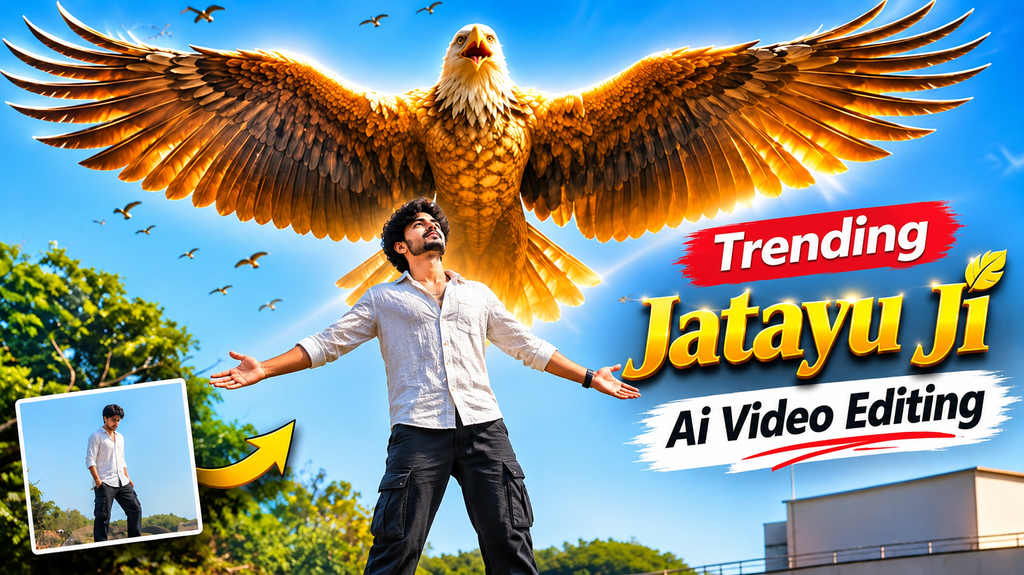
Aajkal Instagram Reels par ek interesting AI video trend kaafi popular ho raha hai, jisme ek person camera ke saamne khada hota hai aur uske peeche ek giant eagle apne bade-bade wings spread karta hua nazar aata hai. Is cinematic scene ko Ramayana Jatayu AI Video Prompt ki help se create kiya ja sakta hai.
Agar aap bhi apni normal photo ko ek cinematic Ramayana Jatayu-style AI video mein convert karna chahte hain, toh yeh tutorial aapke liye hai.
Join Our Channels
Get the latest AI prompts, creative ideas and updates directly on your favourite app.
Is guide mein aapko ek detailed Ramayana Jatayu AI Video Prompt, reference video use karne ka tarika aur Google Flow mein video generate karne ke complete steps milenge.
Sabse achhi baat yeh hai ki aapko professional video editing skills ki zaroorat nahi hai. Bas ek clear photo, reference video aur sahi AI prompt chahiye.
Ramayana Jatayu AI Video Edit Kya Hai?
Ramayana mein Jatayu ek mahaan aur bahadur pakshi the. Jab Ravana Mata Sita ko lekar ja raha tha, tab Jatayu ne unhe rokne ki koshish ki thi.
Isi legendary character se inspired ek cinematic AI video trend social media par dekhne ko mil raha hai.
Is edit mein ek person camera ke saamne khada hota hai. Uske peeche ek massive reddish-golden eagle appear hota hai, apne huge wings spread karta hai aur aasman mein chhote birds bhi fly karte hue dikhai dete hain.
AI technology ki help se aap apni photo ko is type ke cinematic scene mein convert kar sakte hain.
Important: Yeh ek AI-generated creative video hai, kisi movie ka original scene nahi.
Ramayana Jatayu AI Video Banane Ke Liye Kya C
Ramayana Jatayu AI Video Prompt 2026 – Copy and Paste
Neeche diya gaya Ramayana Jatayu AI Video Prompt Google Flow ke liye design kiya gaya hai. Is prompt mein @video1 ko reference video aur @image1 ko aapki personal photo ke roop mein use kiya gaya hai.
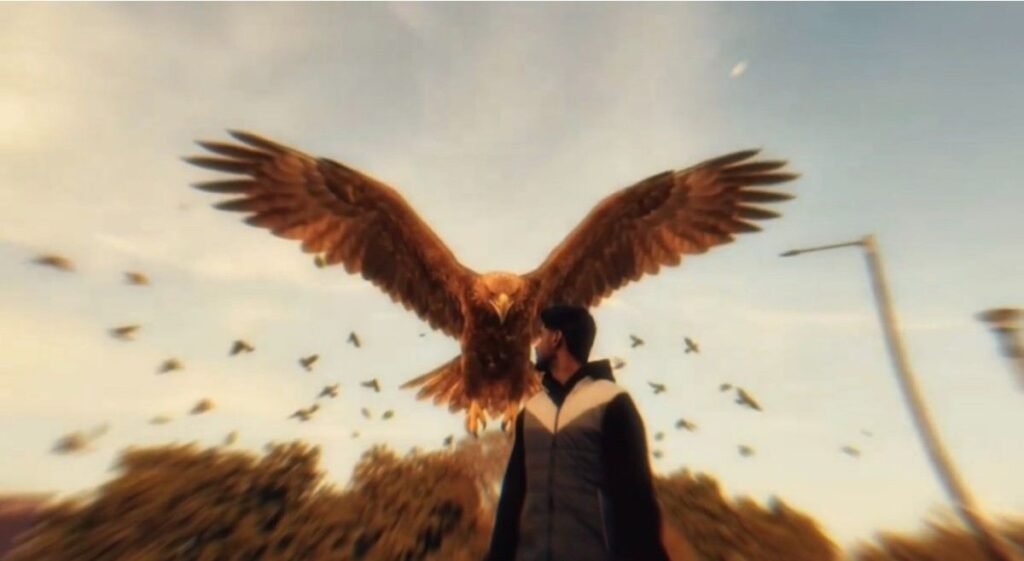
Main Jatayu Cinematic AI Video Prompt
Use @video1 as the strict reference for all actions, gestures, timing, camera movements, framing, editing, the giant eagle, the flying birds, and all visual effects. Replace the man in @video1 with the character from @image1, preserving his complete character design—face, hair, beard, skin tone, body proportions, clothing, and distinctive details—with his face clearly visible and identical to @image1 from the first frame to the last, without blending or morphing with the original man. Maintain the giant reddish-brown eagle exactly as seen in @video1, keeping its massive scale, glowing golden-brown feathers, slow powerful wingbeats, and the exact timing as it rises behind him with wings spread wide, along with the flock of small birds flying around. Preserve the original environment and cinematography, including the sky, clouds, dry bushes, lamp posts, warm golden color grade, low camera angle, duration, and aspect ratio, changing only the man's appearance. Keep the sky and entire frame completely clean and free of any text, titles, captions, or overlays.

Negative Prompt: text, letters, words, titles, captions, subtitles, original man's face, identity swap, face morphing, appearance drift, altered actions, smaller eagle, missing eagle, extra characters, distorted faces, extra limbs, distorted wings, flickering, new scenes, logos, watermarks.
Prompt Mein @video1 Aur @image1 Ka Kya Meaning Hai?
- @video1: Jatayu edit ka reference video. Isse AI ko movement, camera angle, timing aur scene composition samajhne mein help milti hai.
- @image1: Aapki original photograph. Isse AI ko aapka face aur appearance reference milta hai.
Dono references ko sahi tarike se attach karna zaroori hai. Google Flow ke interface mein reference add karne ka option model aur workflow ke hisaab se alag ho sakta hai.
Bonus: Cinematic Jatayu AI Video Prompt
Agar aap ek slightly different cinematic look create karna chahte hain, toh yeh alternative prompt try kar sakte hain.
Create a breathtaking cinematic scene inspired by the legendary Jatayu from the Ramayana.

Use @image1 as the exact identity reference for the person. Preserve the original face, facial features, hairstyle, beard, natural skin tone and clothing without any changes.

The person stands confidently in an open outdoor environment under a dramatic golden sunset sky. Behind the person, a gigantic majestic eagle inspired by Jatayu slowly rises into the sky and spreads its enormous reddish-golden wings.

The eagle's feathers move naturally in the wind. Several smaller birds fly around it, creating a powerful mythological atmosphere.

Use realistic feather details, dramatic sunlight, cinematic depth, natural shadows and smooth camera movement.

The person remains completely recognizable throughout the video. Maintain consistent facial identity in every frame.

Ultra-realistic visual quality, epic mythological atmosphere, professional cinematic composition, realistic animation.

No text, no subtitles, no logo, no watermark.
Google Flow Mein Ramayana Jatayu AI Video Kaise Banaye?
Ab baat karte hain actual video generation ki. Neeche diye gaye steps follow karke aap apna Jatayu AI video create kar sakte hain.
Step 1: Google Flow Open Karein
Sabse pehle Google Flow ki official website open karein:
Apne Google account se sign in karein. Aapke account mein available features aur generation limits alag ho sakte hain.
Step 2: New Project Start Karein
Google Flow open hone ke baad New Project ya Create Project option select karein.
Isse aapka new AI video project start ho jayega.
Step 3: Reference Video Upload Karein
Ab Jatayu edit ka reference video upload karein.
Reference video AI ko original scene ka movement, eagle ki position, camera movement aur overall visual style samajhne mein help karega.
Step 4: Apni Photo Upload Karein
Ab apni ek clear photograph upload karein.
Aisi photo select karein jisme face clearly visible ho aur image blur na ho.
Step 5: Ramayana Jatayu AI Video Prompt Paste Karein
Ab upar diya gaya main Ramayana Jatayu AI Video Prompt copy karein aur Google Flow ke prompt section mein paste karein.
Check karein ki @video1 reference video aur @image1 aapki photo ko correctly represent kar rahe hain.
Step 6: Video Aspect Ratio Select Karein
Video settings mein 16:9 aspect ratio select karein, agar aapke selected workflow mein yeh option available hai.
16:9 ek wide-screen format hai jo cinematic video ke liye suitable hai.
Instagram Reels ke liye aap baad mein video ko 9:16 format mein crop kar sakte hain.
Step 7: Generate Button Par Click Karein
Ab Send ya Generate button par click karein.
Google Flow aapke references aur prompt ke according AI video generate karna start karega.
Generation complete hone tak wait karein. Processing time aapke selected model aur available resources par depend kar sakta hai.
Step 8: Video Download Aur Share Karein
Video generate hone ke baad usse preview karein.
Agar result achha hai, toh download karke Instagram Reels, YouTube Shorts ya Facebook par share kar sakte hain.
Instagram Reels ke liye zaroorat padne par kisi video editor se 16:9 video ko 9:16 mein crop kar sakte hain.
Better Jatayu AI Video Banane Ke Tips
Agar aap chahte hain ki aapka Ramayana Jatayu AI Video Prompt achha result de, toh in tips ko follow karein:
- High-quality photo use karein: Blurry photo se face details change ho sakti hain.
- Face clearly visible rakhein: Front-facing photograph generally useful hoti hai.
- Correct reference video upload karein: Prompt aur reference video mein same scene hona chahiye.
- Identity preservation instructions use karein: Isse AI ko original appearance maintain karne ki clear instruction milti hai.
- Prompt ko unnecessarily edit na karein: Pehle original prompt se result generate karein.
- Multiple attempts try karein: AI-generated results har attempt mein thode different ho sakte hain.
- Permission lekar photo use karein: Kisi doosre person ki photo use karne se pehle unki permission zaroor lein.
Common Problems Aur Unke Solutions
1. AI Video Mein Face Change Ho Raha Hai
Is problem ko reduce karne ke liye clear, front-facing photo use karein. Prompt mein exact facial identity preserve karne ki instruction rakhein.
2. Jatayu Eagle Properly Generate Nahi Ho Raha
Reference video aur prompt ko carefully check karein. Eagle ke size, appearance aur movement ko clearly describe karein.
3. Video Mein Unnatural Movement Aa Raha Hai
Ek clear reference video use karein. Prompt mein smooth, realistic wing movement aur natural camera motion mention karein.
4. Video Blur Aa Raha Hai
High-quality input photo aur suitable generation settings use karein. Har AI generation mein identical output ki guarantee nahi hoti.
5. Instagram Reels Mein Black Bars Aa Rahe Hain
Agar aapne 16:9 video generate kiya hai, toh Instagram Reels mein black bars aa sakte hain. Kisi video editor se video ko 9:16 mein crop ya reframe karein.
Frequently Asked Questions (FAQs)
Q1. Ramayana Jatayu AI Video Prompt Kya Hai?
Ramayana Jatayu AI Video Prompt ek text instruction hai jo AI video generator ko Jatayu-inspired cinematic scene create karne mein help karta hai. Ismein aap apni photo ko reference ke roop mein use kar sakte hain.
Q2. Jatayu AI Video Google Flow Se Kaise Banaye?
Google Flow open karein, reference video aur apni photo upload karein, prompt paste karein aur Generate button par click karein.
Q3. Kya Google Flow Free Hai?
Google Flow ki free access, credits aur generation limits time ke saath change ho sakti hain. Latest availability check karne ke liye official website par apne account mein sign in karein.
Q4. Kya Is AI Video Mein Apna Face Use Kar Sakte Hain?
Haan, aap apni photograph ko identity reference ke roop mein use kar sakte hain. Better result ke liye clear photo aur face-preservation instructions use karein.
Q5. Instagram Reels Ke Liye Kaunsa Ratio Best Hai?
Instagram Reels ke liye 9:16 vertical format suitable hai. Agar aapka generated video 16:9 hai, toh use crop ya reframe kar sakte hain.
Q6. Kya Kisi Friend Ki Photo Use Kar Sakte Hain?
Haan, lekin kisi doosre person ki photograph use karne se pehle unki permission lena zaroori hai.
Conclusion
Ab aap jaan gaye hain ki Ramayana Jatayu AI Video Prompt ki help se apni photo ko ek cinematic Jatayu-inspired AI video mein kaise convert kar sakte hain.
Google Flow mein reference video upload karein, apni clear photograph add karein aur upar diya gaya prompt paste karke video generate karein.
Best result ke liye different photos aur prompt variations try karein. Apne final AI video ko Instagram Reels aur YouTube Shorts par share karna na bhoolein.
Agar aapko AI photo editing aur viral video prompts pasand hain, toh hamare website par aur bhi trending AI prompts explore karein.
Jai Shri Ram! 🙏